Insights for website owners
How to turn your company's documents, price lists and contracts into a secure internal advisor
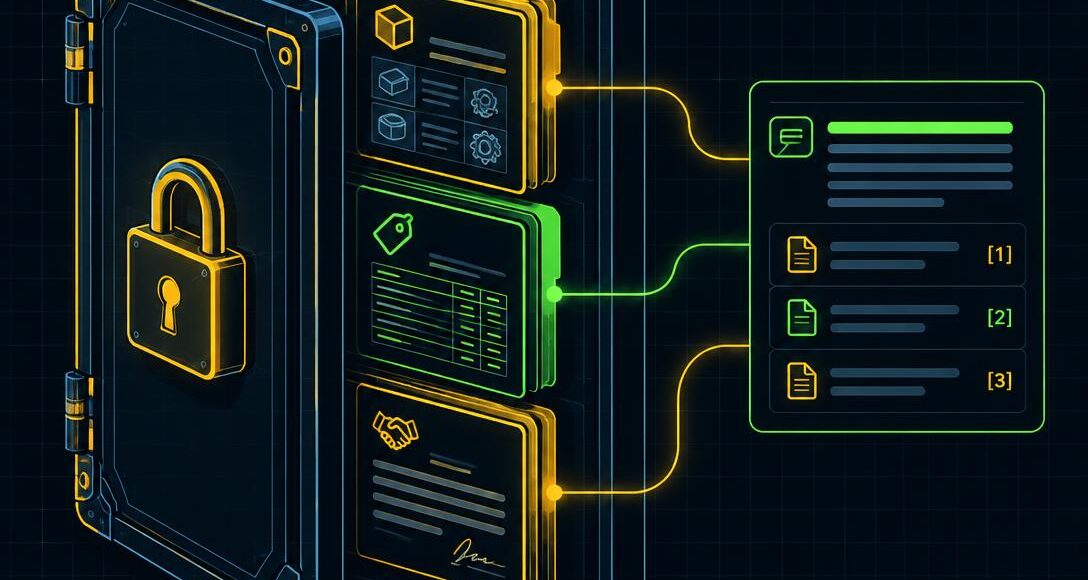
In every growing company a huge amount of time is lost looking for information that already exists in-house: where the latest valid price list is, what the warranty terms are for a specific product, or how we solved a similar project last year. Modern process architecture solves this with a secure, closed knowledge base.
Why isn't general-purpose AI suitable for internal business data?
When companies try to speed up admin with freely available public chatbots, they quickly hit two serious obstacles:
- Made-up data (hallucinations): General models are trained to always produce a convincing answer - even when they don't know the right one. Ask such a system about a specific clause or a technical limitation of your product and the answer will often sound expert but be wrong. In business you can't afford guesswork.
- Data security and confidentiality: Uploading internal price lists, margins, supplier contracts or technical documentation into open public tools without the right security settings risks your business data becoming part of public model training.
The "closed digital notebook": a system that reads only your sources
The most useful AI development for small and medium-sized companies isn't writing poems or generic emails - it's closed retrieval of knowledge from verified sources.
Imagine a secure digital cabinet into which you upload only your company's documents:
- PDF catalogues, technical data sheets and user manuals,
- current price lists and discount rules,
- contract templates, general terms and conditions and internal policies,
- notes from past projects and answers to clients' frequent questions.
On top of this collection runs a smart interface with one strict engineering rule: it answers only on the basis of the company's own documents. If the information isn't in your documents, the system doesn't guess from the web - it says clearly that the internal sources don't contain it. What's more, every answer includes the exact source (which document and which page), so you can check any claim in a second.
Three examples where such a system saves the most hours
- Fast sales support in the field or by phone: A salesperson is in a meeting with a client or on a building site. The client asks a specific technical question about whether two components are compatible. Instead of calling the office or scrolling through an 80-page PDF, the salesperson asks the internal knowledge base on their phone and gets the exact answer in five seconds, with the page reference in the data sheet.
- Onboarding new staff without burdening management: A new colleague usually spends the first three months constantly asking more experienced colleagues about internal procedures. With an organised knowledge base, the newcomer has a digital mentor who knows every internal rule, complaints procedure and company standard.
- Preparing complex quotes and summaries: Upload a client's enquiry or tender documentation (e.g. 40 pages of requirements) and ask the system to compare it with your technical specifications, list any deviations and prepare a structured draft quote.
Comparison: classic folder search vs a smart knowledge base
| Situation | Classic work with folders and documents | Closed smart knowledge base |
|---|---|---|
| Finding a detail in a 100-page PDF | Opening files manually and searching by keyword (10–20 min) | A question in plain language and an instant answer with a page citation (10 sec) |
| Reliability of the answer | Depends on whether you opened the latest version of the file | Tied only to approved documents in the base (no guessing from the web) |
| Sharing knowledge in the team | Knowledge sits in individuals' heads; holidays or departures leave a gap | Knowledge stays permanently structured and available to authorised people |
| Access in the field | Clumsy opening of large files on a phone | A simple conversational interface in the phone's browser |
Frequently asked questions
Are our business documents safe from competitors in such a system?
Yes. Closed business knowledge bases are designed so that your data is completely separated from the public web and is never used to train public AI models. Access is protected and limited to authorised people in your company.
What happens when we change the price list or update the general terms?
You simply replace the old document with the new one or update the text. The system refreshes its knowledge within seconds and from then on uses only the new information in every answer.
Do we need our own servers and expensive hardware for this?
No. The whole environment is set up in a secure cloud and connected to your existing working environment or website back office - without large upfront investment in hardware.
Does your company have lots of documents, price lists and manuals you'd like to turn into a fast, secure tool for your team? See how process automation within the AI & GEO Growth package works, or try a free AI review of your website.